
Perspective Components Module
Fourteen components that close Perspective's biggest UI gaps
Free, open-source components for Ignition 8.3 that fill the gaps Perspective teams hit first: drag-and-drop scheduling boards and calendars, an editable data grid, the user, roster and schedule management Vision had, and a touch keyboard that ends the double-keyboard problem.
Free and open source · Apache-2.0 · Ignition 8.3.6+
The flagship six, up close
Pan & Zoom View
Take any Perspective view, a plant overview, a P&ID, a whole line, and navigate it like a map. Drag to pan, scroll or pinch to zoom toward the cursor. Everything inside stays clickable while you do.
- Points of interest: jump to a machine from the built-in dropdown, a script or a binding
- A minimap shows where you are, and POIs outside the view get an edge indicator you can click to fly there
- The viewport is scriptable. Write zoom or center from a binding and the view glides there
Branching Diagram
Draws decision trees and flow paths for track-and-trace, batch lineage and routing views. You hand it a flat list of nodes. It works out the layers, routes the connectors and tells you about anything it could not draw.
- Label any edge, give it its own colour or dash style, and turn on arrows when flow direction matters
- Nodes show markdown hover cards and fire click events for drill-downs
- Wrap it in the Pan & Zoom View to navigate big trees like a map
Date/Time Range Picker
If you have ever fought the stock date range selector, this one is the fix. Two clicks pick a range booking-style, with a hover preview, precision down to seconds, and inline or popover layouts. Bind the outputs once and every history query follows the selection.
- Rolling presets can go live: "last 8 hours" keeps re-deriving from now, so bound queries keep up on their own
- Block past or future dates, set bounds and span limits. Disabled days explain themselves in a tooltip
- Outputs come query-ready as ISO instants and epoch milliseconds, plus duration and validity
Resource Timeline
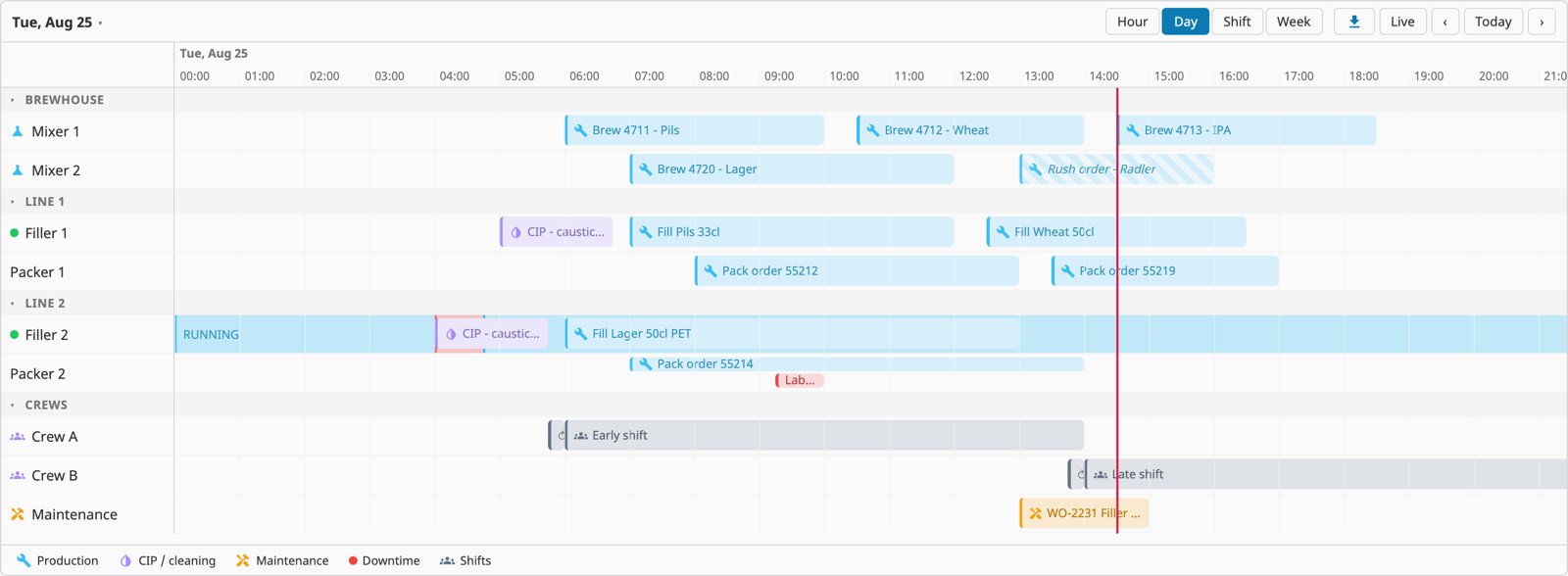
A production scheduling board. Machines, lines and crews are rows on a zoomable time axis. Operators drag an order to retime it, drop it on another row to reassign it, or pull an edge to resize. One onChange event hands your script the final result to save.
- Zoom from milliseconds to weeks, or bind your own window, such as one 06:00 to 14:00 shift. The shift preset draws your actual shift boundaries on the axis
- Bars for orders, full-height bands for machine states, background spans for context, plus rrule recurrence
- The board publishes its visible window, so your query only fetches what is on screen
Calendar / Scheduler
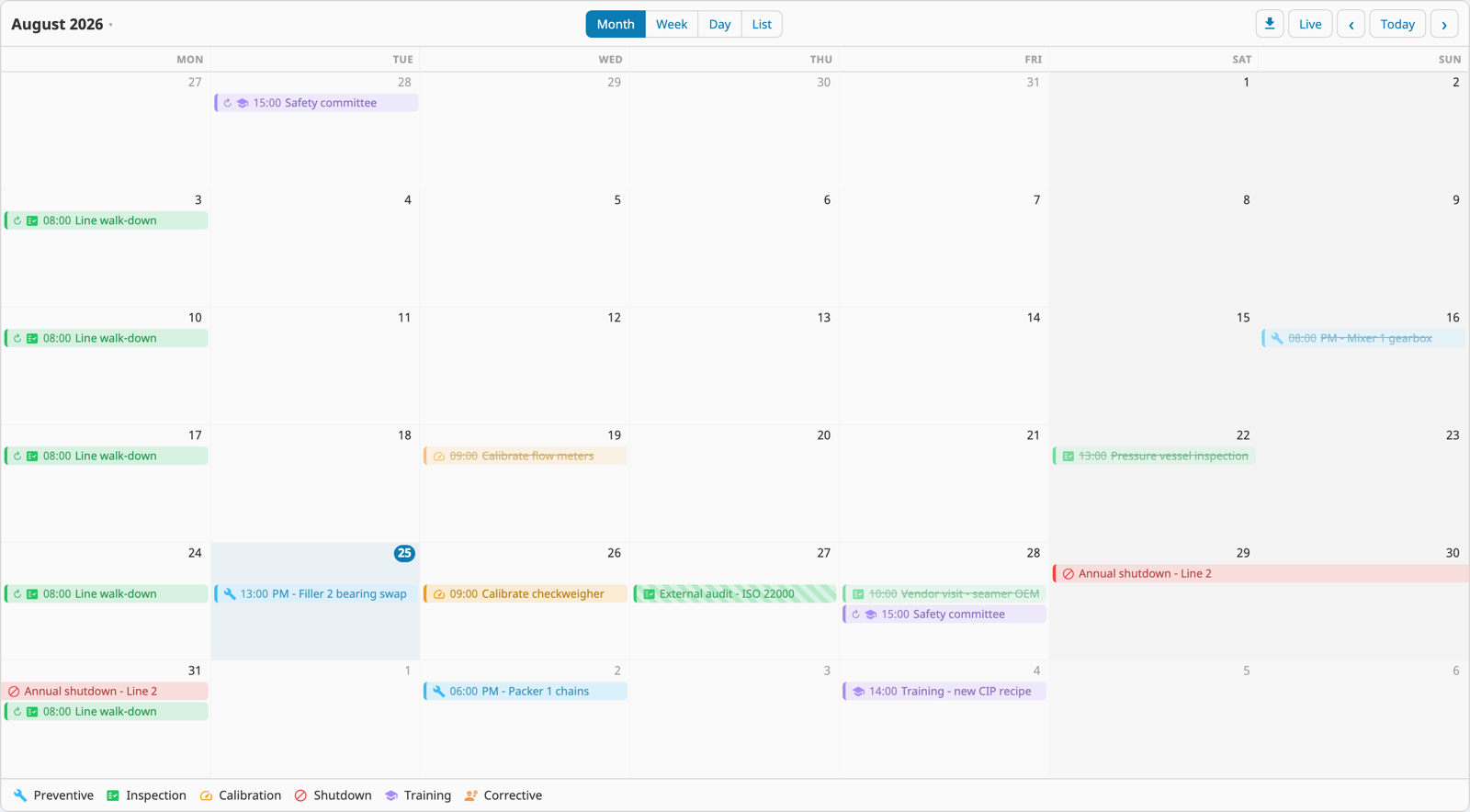
Month, week, day and agenda views over a plain JSON event list. No FullCalendar licence, no iframe tricks. Drag to move or resize, use the built-in editor, or wire up your own with the intent events.
- Multi-day events render as spanning bars, and busy days collapse into a "+N more" popover
- Recurring events done properly, including the "this event or all events" question when you edit one
- One onChange handler covers create, edit, delete, move and resize
The admin family
Vision has Schedule, Roster and User Management components. Perspective never got them, and the Ideas portal request has been open since 2019. This module ships all three, plus a Holiday Manager, as components you compose into one admin console.
- Paint shift schedules onto a week grid, drag roster contacts into escalation order
- Edit users, roles, contact info and vacation overrides without opening the gateway config
- Put each manager on its own page and Perspective security levels decide who may edit what
Every component in the module
All fourteen sit in one palette category, follow the same data-in, events-out contract, and pick up their colours from the active Perspective theme. The module also adds system.mustry.toast(), which shows a toast notification on any page from any script, gateway scripts included, with no component to place.
Date/Time Range Picker
Booking-style range selection with presets and live rolling windows.
Calendar / Scheduler
Month, week, day and list views; editable, recurring, data-bound.
Resource Timeline
Drag-and-drop scheduling board, zoomable from a machine cycle to a week.
Data Grid
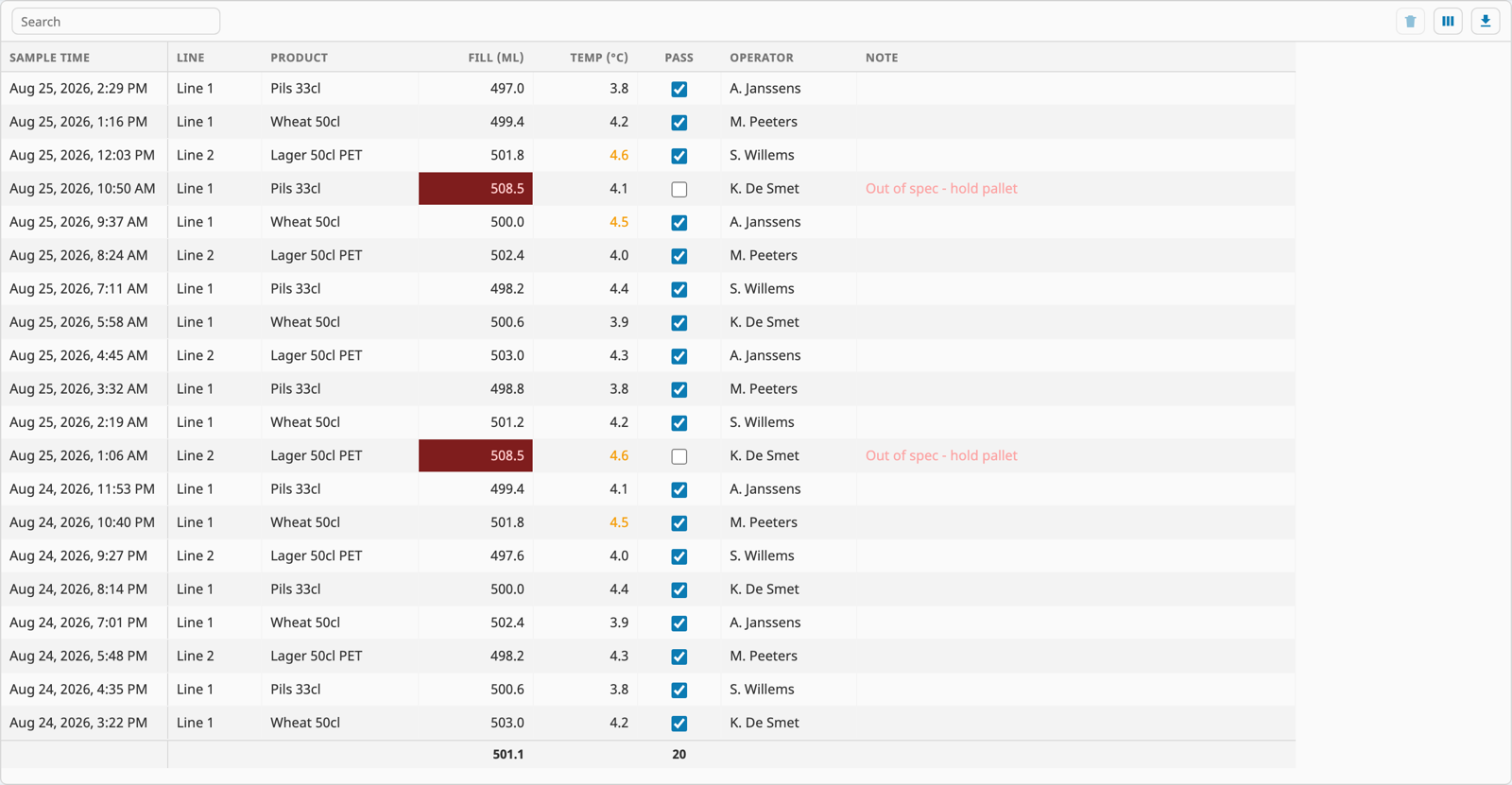
Virtualized editable grid with typed validation and batch save.
Pan & Zoom View
Embed any view and navigate it like a map, with fly-to targets and a minimap.
Branching Diagram
Layered tree and flow renderer for lineage and routing views.
Rich Text Editor
Sanitized WYSIWYG for SOPs and shift notes, with operator checklists.
Code / JSON Editor
Syntax-highlighted editing for JSON, SQL, Python and XML, with live JSON validation.
Color Picker
The runtime colour input Perspective only has at design time.
On-Screen Keyboard
Touch keypad and QWERTY that never summon the OS keyboard.
Schedule Manager
Paint-editable gateway user schedules with an active-now preview.
Roster Manager
Alarm rosters in drag-to-reorder escalation order.
User Manager
Gateway users, roles and contact info, edited at runtime.
Holiday Manager
The holiday dates your schedules observe, finally editable.
Built the Perspective way
Controlled, like the platform
Components render what you bind and never change it behind your back. Gestures fire events, your script saves. Most components need exactly one write-back handler, and the demos include it ready to paste.
Themed by your theme
Every colour is a CSS variable that defaults to the active Perspective theme. Restyle a component with a style class or the project stylesheet. No rebuild, no forked assets.
Localised out of the box
Built-in UI text ships in English, French, German, Spanish, Dutch, Italian and Portuguese, with per-string overrides when your site says it differently.
Documented where you work
Every prop has an inline description right in the Designer, and each component has a live demo view in the repo, DB-backed binding recipes included.
Signed and tested
Builds are signed, and an end-to-end suite drives every component in CI before release. Runs on Ignition 8.3.6 and later, Maker Edition included. Need more than that? We do support and custom component work too.
Free and open source
Apache-2.0 on GitHub. No trial, no activation, no fee per gateway. Run it everywhere, open an issue when something bugs you, or send a pull request if you beat us to the fix.
The real thing, running
No mockups here. These are the components rendering live data from the demo projects in the GitHub repo, so you can spin up a gateway and click through the same screens yourself.
Why this module exists
Every Perspective team hits the same walls sooner or later. Calendar and scheduling views end up as embedded iframes. Admin screens send operators back to the gateway config pages. Touch panels fight the double-keyboard problem. We built these components to close those gaps natively. Drag one from the palette, bind your data, and stay inside Perspective's binding, scripting, theming and security model.
What you get
A signed module for Ignition 8.3.6 and later with all fourteen components under one palette category, a user manual, and the full source on GitHub under Apache-2.0. The Branching Diagram began as our standalone Branching Module. It lives here now, with a better layout engine and per-edge styling, and the old module is archived.
Running Ignition Edge?
Contact Mustry Solutions before you deploy the module on an Ignition Edge gateway, so we can check your setup with you first.
Up and running in three steps
- 1
Download
Grab the signed .modl from GitHub. One file, no account, no licence key.
- 2
Install
Upload it on the gateway's Modules page and accept the certificate. It loads straight away, no gateway restart.
- 3
Drag and bind
Find the components in the Designer palette under "Mustry Solutions", drop one in a view and bind its data props.
Get Perspective Components Module
Perspective Components Module is free and open source. Grab the latest signed module from GitHub releases.